Mimic Studio User Guide
Mimic Studio is the visual IDE for OpenMimic, built with React 18, Vite, and Mantine. It enables interactive design of data generation streams, live previews, statistical quality checks, DAG stream topologies, and real-time observability.
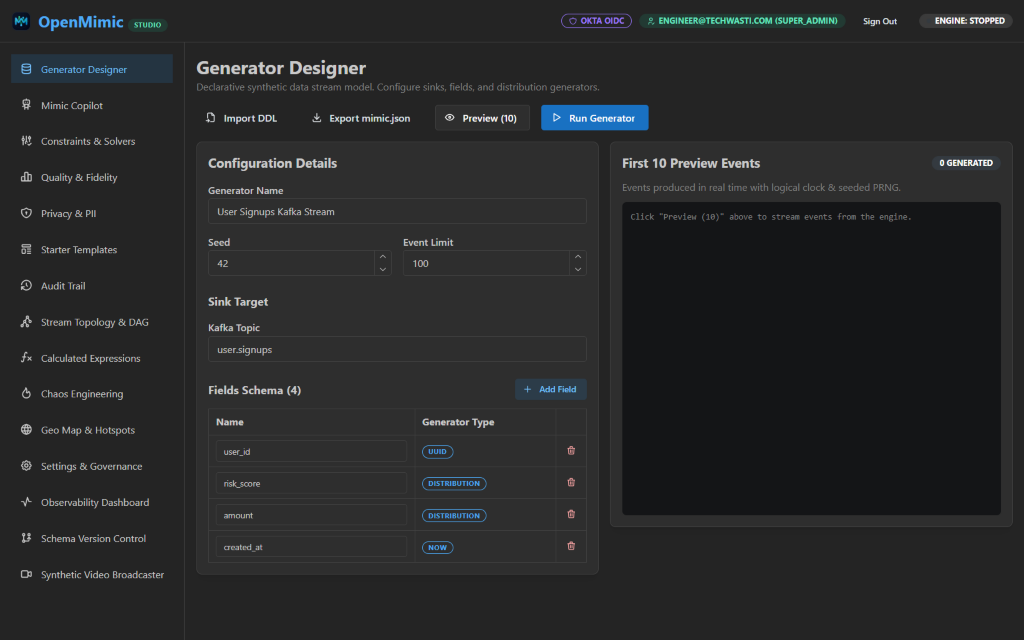
🎨 Studio Navigation & Feature Tabs
Mimic Studio provides 9 integrated workspaces accessible from the left sidebar:
- Generator Designer: Build, edit, and configure schemas, distributions, and sinks (Kafka, PostgreSQL, Redis, ClickHouse, S3, Stdout).
- Mimic Copilot: Interact with the natural-language generation assistant to convert plain English into validated Protocol Buffers configurations.
- Constraints & Solvers: Define field and cross-field predicates (
amount > 50000 && fraud_flag == 1). The engine evaluates candidates and resamples until all predicates are satisfied. - Quality & Fidelity: Inspect statistical fidelity metrics against reference data, including the two-sample Kolmogorov-Smirnov test (KS test) and Pearson correlation coefficient.
- Privacy & PII Scanner: Proactively detect unmasked sensitive identifiers (
email,ssn,phone,card) and verify deterministic masking transforms. - Starter Template Library: One-click launch production-grade blueprints (e.g. E-commerce Order Flow, Financial Fraud Stream, User Funnels).
- Audit Trail: Review immutable enterprise logs tracking generator starts, stops, and schema edits.
- Stream Topology & DAG: Orchestrate multi-stream directed acyclic graphs (e.g.
Usersstream emitting IDs before childOrdersstream executes). - Observability Dashboard: Real-time throughput (events/sec), latency p99, and error dashboards powered by Recharts.
🛠️ Step-by-Step Workflow
1. Designing a Generator
- Navigate to Generator Designer.
- Specify the Generator Name, Seed, and Event Limit.
- Choose your destination sink:
- Kafka: Set topic (e.g.
user.signups) and broker endpoints. - PostgreSQL: Configure connection string and destination table.
- Redis: Choose key pattern and write mode (
SET,LPUSH,RPUSH,PUBLISH, orXADDstreams). - ClickHouse: High-throughput columnar table ingestion formatted as
JSONEachRow. - Stdout: Formatted or raw NDJSON streaming directly to the terminal.
- Kafka: Set topic (e.g.
- Click Add Field to introduce new properties:
uuid: Deterministic RFC 4122 v4 UUID.distribution: Normal or Uniform distribution for quantitative variables (e.g. latency, risk scores, payment amounts).now: Logical timestamp formatted as RFC3339,epoch_ms, orepoch_s.string_faker: Contextual strings (emails, names, locations, custom regex patterns).weighted_choice: Probabilistic branches (success vs failure ratios).entity_pool: Relational foreign-key references to guarantee customer/device entity reuse.nested_object: Deeply nested JSON object structures.array: Repeating variable-length collections.media_meta: Image, audio, and video mock metadata with checksums and storage URIs.
2. Live Preview Streaming
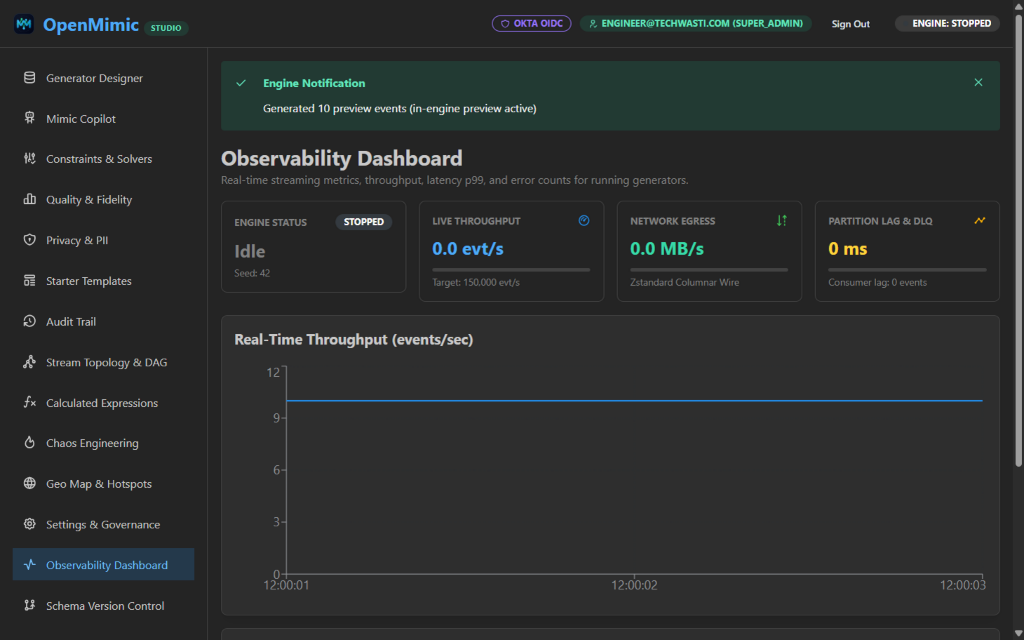
Before streaming live events into production message queues or databases, use the Preview (10) feature:
- Clicking Preview (10) triggers an isolated request to the Engine.
- The engine executes 10 iterations in-memory using the exact logical clock and seed configured.
- The output displays in real time on the right-hand panel as formatted JSON records.
3. Business Predicates & Constraint Solving
Switch to Constraints & Solvers:
- Add rules such as
risk_score > 20 && risk_score < 80oramount > 50000 && fraud_flag == 1. - Set
max_resample_retries(default: 100). - OpenMimic automatically discards non-conforming samples until the constraint predicate evaluates to
true. - Add Anomaly Playbooks to simulate edge cases (corrupt payloads, null fields, burst spikes) at configurable percentage rates.
4. Running & Stopping Pipelines
- Click Run Generator to dispatch the configuration to the OpenMimic Engine via
POST /api/generators/start. - The status pill in the header transitions to
Engine: RUNNING. - To halt stream execution at any time, click Stop Generator.
5. Multi-Generator DAG Orchestration
Switch to Stream Topology & DAG:
- View directed acyclic graph nodes (e.g.,
user_signups_stream→orders_placed_stream). - Configure downstream dependency triggers and delay offsets (
delay_after_parent_ms). - Link upstream streams to real-time streaming CEP window rollups.
- Click Execute Full Topology to trigger coordinated multi-topic generation.
6. Observability & Throughput Dashboard
Switch to Observability Dashboard:
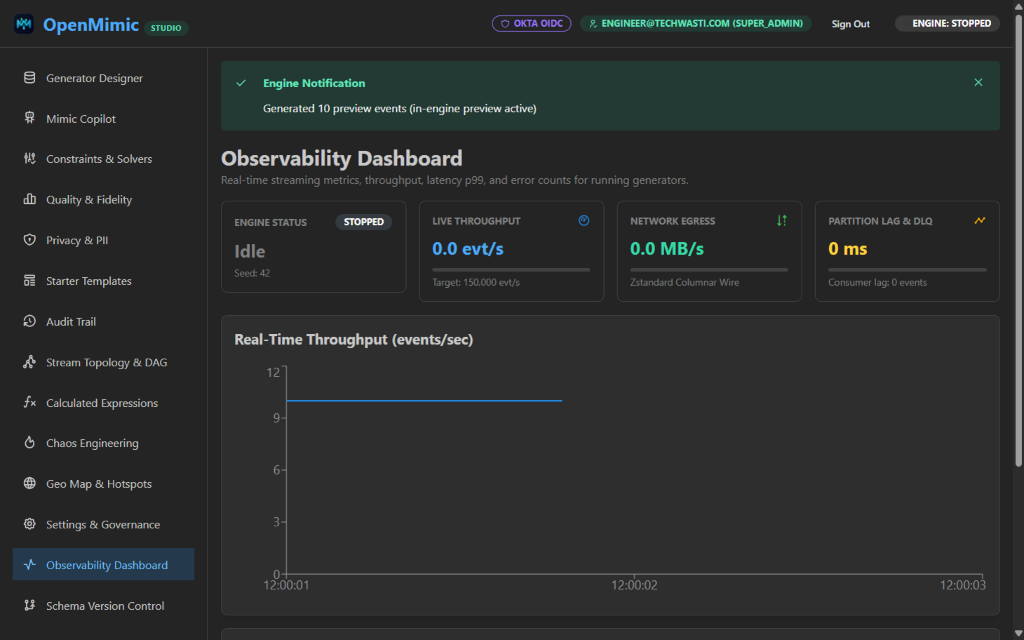
- Live Throughput Gauge (EPS): Visual velocity gauge monitoring events per second against configured capacity limits.
- Network Egress Gauge (MB/s): Real-time bandwidth tracking with columnar Parquet dictionary and wire codec statistics.
- Partition Lag & DLQ Counter: Real-time consumer lag and dead-letter queue spillover monitoring.
- Distributed Cluster Workers: Scale-out node table monitoring partitioned generation agents.
7. Geo Map & Hotspots
Switch to Geo Map & Hotspots:
- Interactive geographic projection visualizer for simulated latitude/longitude coordinates and correlated regional IP hotspots.
- Inspect spatial distribution and bounded region clusters in real time.
8. Schema Version Control & Visual Diff
Switch to Schema Version Control:
- Side-by-Side Diff Inspector: Compare fields, types, distributions, and sink definitions between releases (e.g.
v1.0.0-prodvsv1.2.0-rc1) with color-coded diff tags (ADDED,REMOVED,UNCHANGED). - Git Branch Switching: Seamlessly switch between active Git schema branches (
main,feature/lakehouse-ingest,v2-candidate). - One-Click Version Tagging: Snapshot and tag version releases with author stamps and commit messages.
9. Synthetic Camera Video Broadcaster
Switch to Synthetic Video Broadcaster:
- Live Frame Player: Real-time visual preview displaying simulated camera frame streams with burnt-in OCR timestamp timecodes.
- Motion Patterns: Switch between
Bouncing Object Tracking,SMPTE Color Calibration Bars, andOptical Sensor Noise. - Codec & FPS Tuning: Configure real-time frame rates (1 to 60 FPS) and MJPEG container encodings.