Model Context Protocol (MCP) Server Integration 🧠
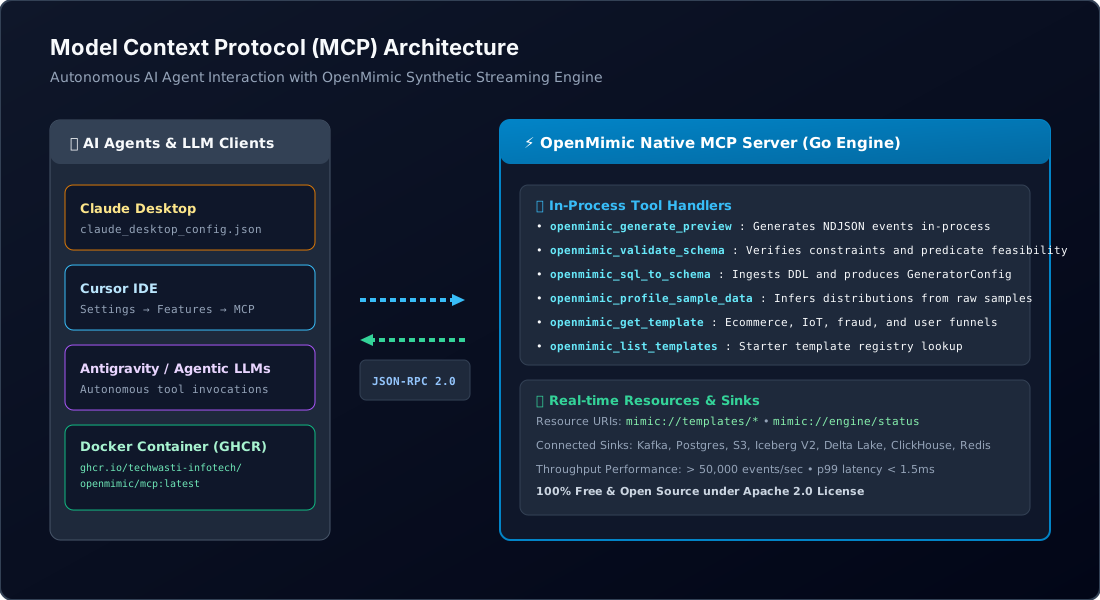
OpenMimic provides native, high-performance support for the Model Context Protocol (MCP) (specification version 2024-11-05).
By connecting OpenMimic’s MCP server to your LLM client (such as Claude Desktop, Cursor, Copilot, Antigravity, or custom enterprise AI agents), your LLM gains autonomous tools to:
- 🧪 Preview synthetic records on-the-fly from declarative JSON / Protobuf schemas.
- ✅ Validate schemas & constraints (verifying data types, distributions, and predicate feasibility).
- 📜 Convert SQL DDL (
CREATE TABLE ...) into ready-to-run streaming generator configurations. - 🔍 Reverse-engineer schemas from sample JSON records with automatic statistical profiling (numeric distributions, categorical weights, UUID detection).
- 📦 Fetch pre-built starter templates (
ecommerce_order_flow,user_signups,iot_telemetry,financial_fraud_stream). - 📚 Read live engine status and schema resources via URI schemes like
mimic://templates/{name}andmimic://engine/status.
⚡ Quick Start: Running the Server
OpenMimic ships the MCP server directly within the Go CLI binary (mimic mcp) as well as a standalone binary (mimic-mcp). It communicates via standard JSON-RPC 2.0 over stdio.
Test via CLI
# Using the main CLI:
mimic mcp

# Or using the dedicated binary:
mimic-mcp
Send an initialization JSON-RPC request:
{"jsonrpc":"2.0","id":1,"method":"initialize","params":{}}
🤖 Configuring Claude Desktop
To use OpenMimic with Claude Desktop, add the OpenMimic MCP server to your claude_desktop_config.json:
- macOS:
~/Library/Application Support/Claude/claude_desktop_config.json - Windows:
%APPDATA%\Claude\claude_desktop_config.json - Linux:
~/.config/Claude/claude_desktop_config.json
Configuration Snippet
{
  "mcpServers": {
    "openmimic": {
      "command": "C:\\path\\to\\OpenMimic\\engine\\bin\\mimic-mcp.exe",
      "args": ["--stdio"]
    }
  }
}
(On macOS/Linux, specify the compiled Go binary path, e.g. /usr/local/bin/mimic mcp or /opt/openmimic/bin/mimic-mcp).
💻 Configuring Cursor IDE
Add the OpenMimic MCP server in Cursor settings:
- Open Cursor Settings -> Features -> MCP Servers.
- Click + Add New MCP Server.
- Set:
- Name:
openmimic - Type:
command - Command:
mimic-mcp --stdio(ormimic mcp)
- Name:
🛠️ Available MCP Tools
| Tool Name | Arguments | Description |
|---|---|---|
openmimic_generate_preview |
config_json (string, required)count (integer, default: 5) |
Runs the high-performance Go generator engine in-process and returns sample records as formatted JSON. |
openmimic_validate_schema |
config_json (string, required)check_constraints (bool, default: true) |
Checks schema syntax and tests predicate constraint satisfiability. |
openmimic_sql_to_schema |
ddl (string, required) |
Converts SQL CREATE TABLE statements into an OpenMimic GeneratorConfig. |
openmimic_profile_sample_data |
samples (string, JSON array)table_name (string) |
Infers column types, distributions (mean/stddev), categories, and null ratios from sample rows. |
openmimic_get_template |
template_name (string, enum) |
Retrieves a pre-built starter configuration (ecommerce_order_flow, user_signups, iot_telemetry, financial_fraud_stream). |
openmimic_list_templates |
(none) | Returns a list of all available pre-built templates and descriptions. |
📚 MCP Resources & Prompts
Available Resources
mimic://templates/ecommerce_order_flowmimic://templates/user_signupsmimic://templates/iot_telemetrymimic://templates/financial_fraud_streammimic://engine/status(Provides engine version, active sink drivers, traffic profiles, and privacy mechanisms)
Available Prompts
design_synthetic_dataset: Guides an LLM through designing a realistic synthetic data generator for stress-testing message queues or databases.convert_sql_to_generator: Guides the conversion of relational schemas into high-throughput streaming generators.
💬 Example LLM Prompts
Once configured in your LLM, you can interact naturally:
User: “I need a synthetic dataset for testing our fraud detection pipeline. Can you fetch the OpenMimic fraud template and preview 5 events?”
User: “Here is my PostgreSQL orders table:
CREATE TABLE orders (id UUID PRIMARY KEY, customer_id INT, amount NUMERIC(10,2), status VARCHAR(20));. Convert this to an OpenMimic configuration and validate it.”
User: “Profile these 3 sample JSON rows from our logs and create an OpenMimic schema for them.”
🐳 Docker Container & GitHub Packages Usage
OpenMimic automatically packages and publishes Docker container images and downloadable artifacts on every release and build.
Running via GitHub Container Registry (GHCR)
# Pull the latest OpenMimic MCP Server container
docker pull ghcr.io/techwasti-infotech/openmimic/mcp:latest

# Run the MCP container interactively over stdio
docker run -i --rm ghcr.io/techwasti-infotech/openmimic/mcp:latest
Configuring Claude Desktop with Docker
If you prefer running OpenMimic MCP inside Docker rather than as a local binary, configure your claude_desktop_config.json:
{
  "mcpServers": {
    "openmimic-docker": {
      "command": "docker",
      "args": [
        "run",
        "-i",
        "--rm",
        "ghcr.io/techwasti-infotech/openmimic/mcp:latest"
      ]
    }
  }
}
📥 Downloading Pre-built Artifacts from GitHub Actions
- Navigate to the OpenMimic GitHub Actions tab.
- Select the latest Release OpenMimic Binaries & Docker Images workflow run.
- Scroll down to the Artifacts section to download:
openmimic-windows-amd64(Containsmimic-mcp.exe,mimic-cli.exe,mimic.exe)openmimic-linux-amd64/openmimic-linux-arm64(Linux executable binaries)openmimic-darwin-amd64/openmimic-darwin-arm64(macOS executable binaries)openmimic-mcp-docker-image(Compressed.tar.gzarchive containing the Docker image ready fordocker load < openmimic-mcp-docker.tar.gz)